
Baby Panda's Emergency Tips
BabyBusEducational
4.1136.00 Reviews
- Version
- 8.75.00.04
- Installs
- 50.00M
- Age Rating
- Everyone
Screenshots
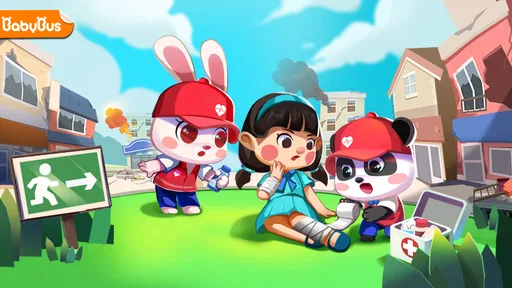

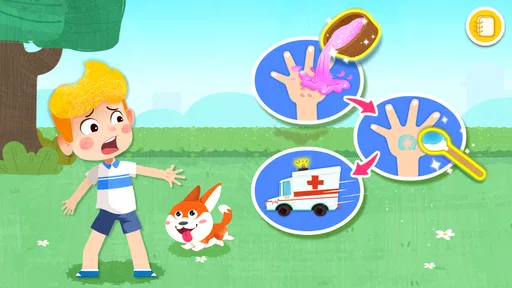
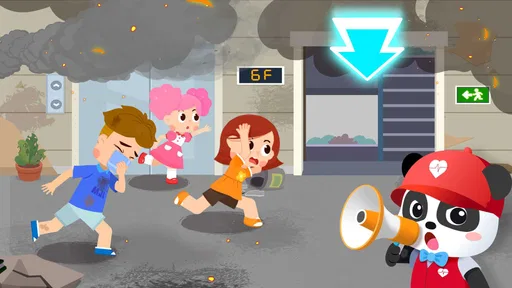
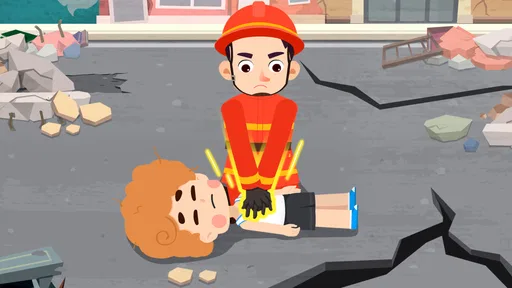

Our Review of Baby Panda's Emergency Tips
 Analysis by Appyee
Teaching a child what to do in an emergency is difficult because the lesson has to be memorable without becoming frightening. Baby Panda's Emergency Tips takes that challenge into a child-friendly educational game from BabyBus, focusing on simple safety situations rather than turning the experience into a serious lecture. I found its biggest value in giving parents a gentle starting point for conversations about getting help, recognizing danger, and protecting yourself.
It is free to download and aimed at Everyone, which makes it suitable for families looking for an age-appropriate introduction to emergency awareness. The game has reached over 50 million installs and holds a 4.1 average from around 21 thousand ratings, so it is clearly a familiar choice among children’s educational apps. Those figures do not replace personal testing, but they do suggest that the format has broad appeal.
How the game presents safety lessons
The experience is built around Baby Panda’s Emergency Tips rather than academic exercises. That distinction matters. A child is more likely to engage with a character-led situation than with a page of instructions, especially when the subject involves accidents or unfamiliar risks. I would use it as a conversation opener: let the child explore a scenario, then pause afterward and ask what they noticed and what they would do at home.
The developer, BabyBus, is well known for making games for young children, and that background shows in the approachable tone. The game belongs in the educational category, but it does not feel like a worksheet converted into an app. Its strongest moments are the ones where the child can connect an action with a consequence in a simple sequence.
That simplicity is also the central trade-off. This is not a substitute for a real emergency plan, a first-aid lesson, or an adult explaining local emergency services. Children need to understand that a game presents a simplified version of a situation. I would avoid telling a child that completing an activity means they are now prepared for every real-world emergency.
Readability and navigation for young players
For a young player, clear presentation is more important than a large amount of content. Baby Panda’s familiar visual style gives the game an immediate sense of direction, while short activities can make the subject less overwhelming. I found that this kind of structure works best when an adult is nearby for the first session, not because the game is difficult, but because children may interpret an animated response differently from a real safety instruction.
The design is easier to approach when the child can follow one visible task at a time. That reduces the need to remember several instructions at once, which is useful for early readers and for children who become distracted by busy screens. Parents should still check whether their child understands the meaning of the pictures rather than assuming that tapping the correct option proves comprehension.
Text-heavy educational games can exclude children who are still learning to read, but a visual, character-based format can lower that barrier. It is worth sitting beside a child and reading any important wording aloud. This turns the game into a shared activity and gives the adult a chance to explain unfamiliar terms in ordinary language.
One practical tip is to play a short session when the child is calm, rather than introducing it immediately after a frightening news story or a real accident. The same lesson can feel reassuring in a relaxed setting and alarming when the child is already upset. A parent’s tone has a major effect on how the safety message is received.
Motor and sensory considerations
Games for children often depend on tapping, dragging, and choosing between visual options. Those actions can be approachable for many players, but they may still be challenging for a child with limited fine-motor control, tremors, slower reactions, or difficulty coordinating both hands. I would not judge understanding by speed. A child who needs more time may know the answer perfectly well.
A tablet or phone can be easier to use than a small handset because the larger display gives more room to see the scene and touch the intended object. On the other hand, a bright animated screen may be tiring for children who are sensitive to movement, sound, or visual clutter. Lowering the device volume, taking breaks, and playing in a quiet room can make the experience more comfortable.
There is also a useful distinction between access and independence. A child may be able to participate with a parent reading instructions, pointing to choices, or helping with a gesture. That is still meaningful access, even if the child cannot use every interaction without assistance. I would treat shared play as a strength rather than a failure of the app.
For children with communication differences, the game can provide a concrete scene to discuss. A parent might ask the child to point, choose a picture, or show the action with a toy. This avoids making spoken answers the only measure of learning. However, the adult should be careful not to force a child to repeat a response aloud if another way of demonstrating understanding works better.
Using it in different everyday situations
The most useful way I found to approach this game is as a short routine. For example, a parent could choose one session before visiting relatives, moving into a new home, or preparing for a family trip. Afterward, the adult can connect the lesson to the actual environment: where to find a trusted grown-up, how to stay nearby in a crowded place, and when to ask for help.
That follow-up is essential because emergency advice depends on context. A child at home, at school, in a shop, or outdoors may need different instructions. The game can help establish the general idea of staying safe, but it cannot know the layout of your home or the adults your child should contact. I would use it to begin a family plan, then make that plan specific.
It can also work well for siblings of different ages if expectations are adjusted. An older child can explain why an action is safer, while a younger child can identify the visual choice. This makes the experience less competitive and gives both children a role. I would avoid turning it into a quiz where the fastest answer wins, because the goal is confidence and understanding rather than speed.
Another non-obvious use is emotional preparation. Some children freeze when they hear the word “emergency,” while others become overly excited by dramatic scenarios. A calm play session lets a parent observe the child’s reaction and correct misunderstandings early. If the child becomes anxious, stopping is more useful than pushing through the lesson.
Where it fits among other safety-learning options
Compared with a printed safety book, the game offers interaction and immediate visual feedback. That can help a child stay involved, especially when sitting still and listening is difficult. A book, however, may be easier to revisit quickly, share with several children, or adapt with your own explanations. I would keep both formats available rather than expecting one to replace the other.
Compared with a video, an interactive game can invite the child to make a choice instead of watching passively. That gives the parent a better opportunity to see what the child thinks. Video may still be preferable for children who find touch controls frustrating or who learn more comfortably by observing someone else.
Compared with formal first-aid training, this is clearly an introductory tool. A course led by a qualified instructor can teach practical responses and correct unsafe habits in real time. Baby Panda’s Emergency Tips is better suited to early awareness, repetition, and family discussion. I would recommend the game for a young child who needs a gentle introduction, but not as the only safety education for a household.
The free price makes it easy to try without committing money up front. There are in-app purchases ranging from forty-nine cents to two dollars and forty-nine cents per item, so I would review purchase controls before handing the device to a child. Even a low-cost optional item can become an unwanted surprise when a child is tapping independently.
Remaining barriers parents should plan around
The main barrier is not necessarily navigation; it is interpretation. A child may remember the animated action but miss the principle behind it. Parents should ask open questions after play, such as “Who could help you here?” or “What would you do if the first adult was not nearby?” These questions reveal whether the lesson transferred beyond the screen.
Another limitation is that a generalized game cannot reflect every family’s circumstances. Children may have different caregivers, mobility needs, communication methods, or medical considerations. The adult should adapt the discussion rather than presenting one response as suitable for everyone. For a child who uses a communication device or needs physical assistance, the family plan should include those realities directly.
Device access can be a barrier too. A child may have to share a phone, play in a noisy room, or use a screen that is too small for comfortable interaction. In those cases, a short, supervised session is more realistic than expecting independent practice. If the child cannot see or hear the activity comfortably, the parent can describe the scene and use it as a prompt for an offline conversation.
I would also be cautious about using the game during an actual emergency. A child should not be asked to search through an app while someone needs immediate help. The useful preparation happens beforehand, when the family can calmly discuss trusted adults, safe places, and the importance of getting an adult’s attention. The game supports that preparation; it is not an emergency tool.
Who should try it, and who may prefer something else
I think it is a good match for parents who want a low-pressure way to introduce safety topics to a young child. It is especially useful when a child responds better to characters and simple choices than to direct warnings. Teachers or caregivers may also find it helpful as a starting prompt for a broader lesson, provided they add explanations suited to the children in their care.
I would look elsewhere if you need detailed first-aid instruction, advanced emergency planning, or a tool designed specifically around a particular disability. In those cases, a qualified course, specialist resource, or carefully adapted offline activity will offer more depth and personal adjustment. The game’s accessibility value comes from its approachable format, not from replacing specialist support.
Families who dislike optional purchases should set device-level restrictions before play. The game itself is free, but the presence of paid items means that “free” should not be treated as the same thing as completely purchase-free. This is a small preparation step, yet it prevents a common source of friction in children’s apps.
My inclusive verdict
Baby Panda’s Emergency Tips succeeds when it is treated as a shared learning aid rather than a complete safety curriculum. I like its gentle, child-focused approach and the way an interactive scenario can make a serious topic less intimidating. Its broad Everyone rating and free entry point make it easy for families to test whether the style suits their child.
Its best accessibility feature is the possibility of learning through pictures, choices, repetition, and conversation instead of relying only on long explanations. That can support children with different reading levels, attention patterns, and communication preferences. Still, the experience may require adult help for children with motor, sensory, language, or comprehension needs, and that support should be viewed as part of the activity.
The current version is 8.75.00.04 and requires Android 6.0 or later, so Android users should check device compatibility before planning a session. The game was released on July 28, 2020, and its continued popularity suggests that the concept remains useful to many families. I would not choose it for technical depth, but I would recommend giving it a try if you want a friendly first step toward talking about emergencies.
My final advice is simple: play alongside your child, keep sessions short, connect each lesson to your real surroundings, and repeat the conversation away from the screen. The game is most valuable when it helps a child practice thinking about safety, not when it is mistaken for a complete emergency plan. Used in that role, it offers a practical and approachable introduction while leaving room for the individualized guidance every family eventually needs.
Verdict
Strengths of Baby Panda's Emergency Tips
- Simple lessons make emergency advice easy for young children to understand.
- Colorful animations help maintain attention during short learning sessions.
- Covers several everyday safety situations in one child-friendly app.
- Interactive activities encourage children to remember basic safety responses.
- Useful for starting safety conversations between parents and children.
Limitations of Baby Panda's Emergency Tips
- Some advice may need parental explanation to match local emergency procedures.
- Content is aimed at younger children and may feel too basic for older kids.
- Repeated activities can become predictable after several play sessions.
- Children may need help reading instructions or understanding unfamiliar situations.
- It should support, not replace, formal first-aid training or adult supervision.
Other Releases by BabyBus
View All
Little Panda Policeman
Educational4.0

Little Panda's Chinese Recipes
Educational4.4

Little Panda's Restaurant
Educational4.4

Little Panda's Ice Cream Games
Educational4.3
Similar Picks in This Category
View AllLittle Panda Policeman
BabyBus4.0

Monster Trucks Game for Kids 2
Raz Games4.1
Little Panda's Chinese Recipes
BabyBus4.4
Little Panda's Restaurant
BabyBus4.4
Little Panda's Ice Cream Games
BabyBus4.3

Baby Panda Care
BabyBus3.8
Frequently Asked Questions
What is Baby Panda's Emergency Tips about?
Baby Panda's Emergency Tips is an educational game for young children that introduces basic safety habits through simple stories, interactive scenes, and playful activities. It covers everyday situations such as getting lost, dealing with minor injuries, fire safety, water safety, and contacting trusted adults. The lessons are presented in a friendly, non-threatening way so children can learn without feeling overwhelmed.
What can children learn from Baby Panda's Emergency Tips?
The game helps children recognize potentially dangerous situations and practice appropriate first responses. Depending on the activity, children may learn to stay calm, move away from danger, ask a trusted adult for help, remember important personal information, and understand why certain safety rules matter. It is designed to reinforce awareness and decision-making, although it should support—not replace—real conversations and supervision from parents or caregivers.
Is Baby Panda's Emergency Tips suitable for toddlers and preschool children?
The app is generally aimed at young children, particularly toddlers and preschool-age users who can follow simple instructions and interact with basic touch controls. Some children may need an adult to explain the scenarios or help them complete activities. Parents should consider the child’s age, language ability, and sensitivity to emergency-themed content before downloading, since comprehension and usefulness can vary considerably between children.
Does Baby Panda's Emergency Tips require an internet connection?
Many activities in children’s educational apps can be accessed after installation, but availability may depend on the specific version, device, and downloaded content. It is best to open the game once while connected to the internet and check whether all lessons work offline before giving it to a child during travel. Internet access may still be needed for updates, advertisements, purchases, or additional content.
Is Baby Panda's Emergency Tips safe for children to use?
The game is designed with child-friendly visuals, straightforward interactions, and educational safety themes. However, parents should review the app’s privacy details, advertising settings, in-app purchase options, and requested permissions before allowing independent use. Emergency lessons should also be discussed outside the game, because children need to know that real emergencies require contacting a trusted adult or local emergency services rather than relying on an app.
Play our best games!


